# Part 2: API Reference

## Introduction

This API (or Application Programming Interface) reference is a set of rules and protocols that defines how a 3rd party project can interact and exchange data with Fiat24 services.

These APIs extends the smart contract functions to access <mark style="color:purple;">off-chain data</mark>.

### Rate Limit

To protect our API from misuse, we enforce rate limits on our endpoints. The basic rule is: the more active users you have, the greater API capacity we provide. Below are the tier details:

* **500 calls/minute** for the projects with 20,000+ active users
* **250 calls/minute** for the projects with 5,000+ active users
* **80 calls/minute** for the rest of projects

The rate will be re-evaluated on a weekly basis, typically on Fridays.

## Secured APIs&#x20;

If an API accesses a user’s profile or performs modifications, it must be secured.

Fiat24 does NOT use any standard protocol for authentication and authorisation. All secured requests need to have a <mark style="color:purple;">header</mark> <mark style="color:purple;">with signed information by the NFT addresss</mark>, which guarantees only the end-user can access his/her data.

The header body is structured as follows:&#x20;

{% code lineNumbers="true" %}

```javascript
const headers = {
    "Content-Type"  : "application/json",
    
    tokenid         : <token id of user>,
    network         : 42161,
    
    sign            : <user's wallet signature>,
    hash            : <original text that was hashed>,
    deadline        : <deadline used for signing>
}
```

{% endcode %}

{% hint style="warning" %}
The  `network`  in header is critical. For example:

* Requesting /iban/12345 with `network=42161` will get `CH68 8305 1000 0000 1234 5`
* Requesting /iban/12345 with `network=5000` in header will get `CH17 8305 1100 0000 1234 5`
  {% endhint %}

The fields `sign`, `hash` and `deadline` can be calculated as:

{% code lineNumbers="true" %}

```javascript
// We only allow the signature to be valid for 20 minutes max.
// Can be less than that if want more security.
const SIGNATURE_DEADLINE_IN_SECONDS = 1200;

// Alternative to Date.now()
// sometimes the device clock is out of sync and can give the wrong timestamp
const serverTimestamp = await fetch("https://api.fiat24.com/timestamp");
const now = serverTimestamp.timestamp;

const deadline = Math.round(now/1000) + SIGNATURE_DEADLINE_IN_SECONDS;

const hash = "Hello world"; // Could be any text

const deadlineHash = web3.utils.sha3(hash + deadline); // web3.js
const deadlineHash = ethers.keccak256(ethers.toUtf8Bytes(hash + deadline)); // ethers

const messageToSign = `I agree to access my profile. ${deadlineHash}`;

const sign = await web3.eth.personal.sign(messageToSign, address); // web3.js
const sign = await signer.signMessage(messageToSign); // ethers

return { hash, deadline, sign };
```

{% endcode %}

where:

* `address` is the address of the user's wallet.
* `signer.signMessage` is the signatures of the user's wallet personal sign.
* Please note that in some programming languages SHA3 function might act a bit different than the `web3.utils.sha3()`. The SHA3 of a simple text such as **SHA3("Fiat24"),** should give as a response **0x1cf688cdaa53bf4605bfbb1ab56565651179978e63d41cf2df557d5bb5f1bd90.**

### 1. Get Client Profile

{% hint style="warning" %}
All those data is very sensitive piece of data and they should be handled and stored with the upmost care.
{% endhint %}

Get the information about user's NFT account.

{% code title="Request with header" %}

```javascript
GET https://api.fiat24.com/br
```

{% endcode %}

{% code title="Response Body" lineNumbers="true" %}

```json
{
    "tokenId"   : 10365,
    "br"        : "Janet Jackson",
    "iban"      : "CH81 8305 1000 0000 1036 5",
    "email"     : "sample@gmail.com",
    "mobile"    : "+41798563254",
    
    "debitCard"      : "MSTD",
    "isCardEligible" : true,
    "cards"          : [], // Field only displayed if isCardEligible true
    "cardActivation" : { 
        // Field only displayed if isCardEligible true and cards === []
        "amount"   : 10,    // 10, 100
        "currency" : "EUR"  // "EUR", "USD", "CHF", "CNH"
    },
    
    "street"     : "Passeig Sant Gervasi",
    "postalCode" : "08022",
    "city"       : "Barcelona",
    "country"    : "ESP",
    
    "limits": {
                "restartDate": "16.09.2023 - 9:04",
                "restartDateMs": 1725523620885,
                "used": 27.88, // value in CHF
                "available": 99972.12 // value in CHF
                "max": 100000.00 // value in CHF
    },

    "contacts": {
       "CHF": [{
                "id"              : "EC-0000001",
                "name"            : "Jake"
                "account"         : "•••• 0001",
                "fullAccount"     : "...",
                "bank"            : "PostFinance",
                "country"         : "CH",
                "lastPaymentDate" : 1700093537000
             },
             ...],
       "EUR": [{
                "id"              : "EC-0000002",
                "name"            : "Marc"
                "account"         : "•••• 1234",
                "fullAccount"     : "...",
                "bank"            : "PostFinance",
                "country"         : "ES",
                "lastPaymentDate" : 1700093537000
             },
             ...]
    },
    
    "depositBank": {
        "CHF": {
            "account"    : "CH8183051000000010365",
            "bank"       : "SR Saphirstein AG",
            "BIC"        : "SAHHCHZ2",
            "payee"      : "Janet Jackson",
            "city"       : "Barcelona",
            "street"     : "Passeig Sant Gervasi",
            "postalCode" : "8022",
            "country"    : "ESP",
        },
        "EUR": {
            "account"    : "CH8183051000000010365",
            "bank"       : "SR Saphirstein AG",
            "BIC"        : "SAHHCHZ2",
            "payee"      : "Janet Jackson",
            "city"       : "Barcelona",
            "street"     : "Passeig Sant Gervasi",
            "postalCode" : "8022",
            "country"    : "ESP",
        }
    }
}
```

{% endcode %}

Notes:

* The  `debitCard` field will be set to `MSTD` when a debit card is eligible; otherwise, it will remain empty
* `limits` section extracts the NFT transactional limit from the smart contract
* `depositBank` section contains user's Fiat24 IBAN, separately in currencies.
* `contacts` section returns a list with all registered Payout bank account details for the given user.&#x20;

### 2. Get Cards

Get the Debit Cards information from a user.

{% code title="Request with header" %}

```javascript
GET https://api.fiat24.com/cards
```

{% endcode %}

#### Response Body

{% code title="NOK, if the card is not available" lineNumbers="true" %}

```json
{
    "statusCode" : 500,
    "tokenId"    : 10365
}
```

{% endcode %}

{% code title="OK, if the card is found" lineNumbers="true" %}

```json
{ 
    statusCode: 200,
    body: [{
        "tokenId": 10365,
        "cardHolder": "Janet Jackson",
        "externalId": "123456",     // Used for the card management APIs
        
        "cardToken": "asdfasdf...", // Token used to display card details
        
        "activeTokens": [{          // Active devices where card is added
            "id": "active_token_id",
            "type": "Fiat24 Phone",
            "createdAt": 1725523620885,
        }],
        "inactiveTokens": [{       // Pending devices where card wants to be added
            "id": "inactive_token_id",
            "type": "Fiat24 Phone",
            "createdAt": 1725523620885,
        }],
        "currency": "EUR24", // Default Card Currency: EUR24, CHF24, CNH24, USD24
        "currencies": ["EUR", "CHF", "USD", "CNH"], // Native currencies supported by the card
        "cardDesign": "MSTD",
        "security": {
            "contactlessEnabled": true,
            "withdrawalEnabled": false,
            "internetPurchaseEnabled": true,
            "overallLimitsEnabled": false
        },
        "limits": {
            "account": {
                "restartDate": "16.09.2023 - 9:04",
                "restartDateMs": 1725523620885,
                "used": 27.88,
                "available": 99972.12,
                "max": 100000.00
            },
            "contactless": {
                "used": 13.02,
                "available": 9986.98,
                "max": 10000,
                "dailyUsed": 0,
                "dailyAvailable": 1600,
                "dailyMax": 1600
            },
            "withdrawal": {
                "used": 0,
                "available": 0,
                "max": 0,
                "dailyUsed": 0,
                "dailyAvailable": 0,
                "dailyMax": 0
            },
            "internetPurchase": {
                "used": 0,
                "available": 10000,
                "max": 10000,
                "dailyUsed": 0,
                "dailyAvailable": 5000,
                "dailyMax": 5000
            },
            transaction : {
                "purchase": 0,
                "withdrawal": 0,
                "internetPurchase": 5000,
                "contactless": 1600,
             }
        },
        "status": "Active", // "Active" / "Blocked" / "Expired"
        "masked": {
            "cardNumber": "•••• 4455",
            "cvv2": "•••",
            "expiry": "••/••",
            "card3DSecurePassword": "••••••"
        }
    },
    ...]
}
```

{% endcode %}

{% hint style="warning" %}
**Important Notices:**

1. If the user doesn't own a card, it returns `statusCode` = 404.
2. `number`, `expiry` and `CVV` fields are very sensitive data, they should not be shown without client's consent. &#x20;
3. All the limits are monthly (excluding dailyUsed, dailyAvailable, dailyMax) and in **EUR**.
   {% endhint %}

#### **Showing the Debit Card**

The `/cards` interface does not expose sensitive debit-card data (such as CVV, expiry date). To show the card, call an external `fiat24card.js` service using the `cardToken` provided by the  `/cards` interface.

{% hint style="danger" %}
Important:

The `cardToken` is only valid for 5 minutes (or 300 seconds). When it expires, the card can't be shown again, and it need to generated again.
{% endhint %}

Currently, we only support Javascript `fiat24card.js` to integrate the showing card function, and here is the codes.

{% code title="JavaScripts to show the debit card" lineNumbers="true" %}

```javascript
// Step 1. Download the file in:
// https://www.fiat24.com/js/fiat24card.js

// Step 2. Integrate code (Sample in React)
// This code only gives you the card details,
// you may need to modify the CSS and HTML to fit your needs 

import React, { useEffect } from "react";
import { isMobile, toastbox } from "utils/util";
    
export default function Fiat24Card({ cardToken, cardHolder }) {
    useEffect(() => {
        if (!!cardToken) {
            const mobile = isMobile();
            if (!window.fiat24card) {
                require("public/js/fiat24card.js"); // path to your fiat24card.js
            }
            if (!!window.fiat24card) {
                window.fiat24card.bootstrap({
                    "clientAccessToken": cardToken,
                    "component": {
                        "showPan": {
                            "cardPan": {
                                "domId": "cardNumbers",
                                "format": true,
                                "styles": {
                                    "span": {
                                        "background": "transparent",
                                        "color": "#000",
                                        "font-size": mobile ? "1em" : "23px",
                                        "font-family": '"Helvetica Neue",Helvetica-Neue,HelveticaNeue,Helvetica, Arial, "Lucida Grande", sans-serif',
                                        "letter-spacing": "2px",
                                        "font-weight": "500"
                                    }
                                }
                            },
                            "copyCardPan": {
                                "domId": "cardNumbersCopy",
                                "mode": "transparent",
                                "onCopySuccess": () => toastbox("toastCopied", 2000),
                                "onCopyFailure": error => {
                                    console.error(error);
                                }
                            },
                            "cardExp": {
                                "domId": "cardExpiryDate",
                                "format": true,
                                "styles": {
                                    "span": {
                                        "background": "transparent",
                                        "color": "#000",
                                        "font-family": '"Helvetica Neue",Helvetica-Neue,HelveticaNeue,Helvetica, Arial, "Lucida Grande", sans-serif',
                                        "letter-spacing": "2px",
                                        "font-weight": "500"
                                    }
                                }
                            },
                            "cardCvv": {
                                "domId": "cardCvvDate",
                                "styles": {
                                    "span": {
                                        "background": "transparent",
                                        "color": "#000",
                                        "font-family": '"Helvetica Neue",Helvetica-Neue,HelveticaNeue,Helvetica, Arial, "Lucida Grande", sans-serif',
                                        "letter-spacing": "2px",
                                        "font-weight": "500"
                                    }
                                }
                            }
                        }
                    },
                    "callbackEvents": {
                        "onSuccess": () => {
                            console.log("Success!")
                        },
                        "onFailure": error => {
                            console.error("Unable to get card details");
                        }
                    }
                });
            }
        }
    }, [cardToken]);

  return (<>
    <div className="flex relative">
        <div className="cc-card-number text-left pointer mb-0">
            <div id="cardNumbers"></div>
            <button type="button" className="card-copy-button" id="cardNumbersCopy"></button>
        </div>
    </div>
    <div className="cc-card-holder text-left">
        <span className="relative small-xs-mobile text-dark" id="cardHolder">{cardHolder}</span>
    </div>

    <div className="flex">
        <div className="cc-card-end text-left flex flex-column w-half">
            <span className="cc-card-end-text text-dark" id="cardExpiry">expiry date:</span><span className="cc-card-end-date relative text-dark" id="cardExpiryDate"></span>
        </div>
        <div className="cc-card-end ml-5 text-left flex flex-column w-half">
            <span className="cc-card-end-text text-dark" id="cardCvv">cvv:</span><span className="cc-card-end-date relative text-dark" id="cardCvvDate"></span>
        </div>
    </div>
  </>
  );
}

```

{% endcode %}

### 3. Get Transactions

Get the transactions from a user.

#### Request Samples:

{% code title="Get last 6 EUR transactions from" lineNumbers="true" %}

```javascript
GET https://api.fiat24.com/transactions?
     currency=EUR
    &fromrecord=0
    &recordscount=6
```

{% endcode %}

{% code title="Get all EUR transactions within a certain period" lineNumbers="true" %}

```javascript
GET https://api.fiat24.com/transactions?
     currency=EUR
    &fromtimestamp=1683797408116
    &totimestamp=1683897408116
```

{% endcode %}

{% code title="With Pagination, record 0 to 50" lineNumbers="true" %}

```javascript
GET https://api.fiat24.com/transactions?
     currency=USD
    &fromrecord=0
    &recordscount=50
    &fromtimestamp=1683797408116
```

{% endcode %}

{% code title="With Pagination, record 51 to 100" lineNumbers="true" %}

```javascript
GET https://api.fiat24.com/transactions?
     currency=USD
    &fromrecord=51
    &recordscount=50
    &fromtimestamp=1683797408116
```

{% endcode %}

**Mandatory Parameters:**

* `currency` **mandatory** as `EUR`, `USD`, `CHF`, `CNH`, `ALL`

{% hint style="warning" %}
The value `ALL` will retrieve transactional data not in real-time, usually 5-15 minutles delay.
{% endhint %}

**Optional Parameters:**

* `fromrecord`   used for paginating (in case we want to do pagination of 10)
* `recordscounts`   records to retrieve. Also used for paginating
* `fromtimestamp`   Timestamp to begin
* `totimestamp`  Timestamp to begin
* `direction` Filter the debit or credit transactions, value of `IN`, `OUT`, `ALL`. Default value is `ALL`
* `type` To filter the transactions by types, multiple value possible, separated by comma ','&#x20;
  * `P2P` Peer-2-Peer transfer
  * `FRX` Forex
  * `CTU` Crypto Top-up
  * `CRD` Card transactions
  * `CDP` Cash Deposit
  * `CWD` Cash Payout

#### Response Body

{% code title="" lineNumbers="true" %}

```json
{
    "tokenid": 903,
    "currency": "EUR",
    "count": 6,
    "totalDebit": 109.00,
    "totalCredit": 109.00,
    "transactions": [
        {
            "title": "COOP-4899ZURICHBAHNHOF",
            "subtitle": "Reserved - ZURICH1SIZH",
            "amount": -1.89,
            "timestamp": 1683221111000,
            "image": "https://www.fiat24.com/img/mastercard.png",
            "txId": "0x815da6bf2b2767c61e11f2378e31d2e92c397b860e18c80b0ed7fb05ed5897a2",
            "from": 9105,
            "to": 903,
            "blockHash": "0x6b7a54812f2d344390c29c001f9ee81cf74cb594d95551ef94f64f51b1f0d810",
            "blockNumber": "238639288"
        },
        {
            "title": "MIG migrolino ZH Tiefenbr",
            "subtitle": "Zurich",
            "amount": -1.02,
            "timestamp": 1683117041000,
            "image": "https://www.fiat24.com/img/mastercard.png",
            "txId": "0x5a9b673377f17a38ecc404ce16d18ba33cae18b253037be5f0f7f9227d4ce8fa",
            "from": 9105,
            "to": 903,
            "blockHash": "0x6b7a54812f2d344390c29c001f9ee81cf74cb594d95551ef94f64f51b1f0d810",
            "blockNumber": "238639288"
        },
        {
            "title": "Coop-4899 Zurich Bahnhof",
            "subtitle": "Zurich 1 Sihl",
            "amount": -1.88,
            "timestamp": 1682695543000,
            "image": "https://www.fiat24.com/img/mastercard.png",
            "txId": "0x5ed3716d8b78c4d749e5addcf4e96f299d1509ba91a61d5f501ce6bac08130f1",
            "from": 9105,
            "to": 903,
            "blockHash": "0x6b7a54812f2d344390c29c001f9ee81cf74cb594d95551ef94f64f51b1f0d810",
            "blockNumber": "238639288"
        },
        {
            "title": "@nicosaphirstein",
            "subtitle": "#903",
            "amount": "29405.00",
            "timestamp": 1682673347000,
            "image": "https://www.fiat24.com/api/avatar/903",
            "txId": "0xded890834ca450dbf64e8eaad51cbc99edb027425980695e0e928f794a41e9cb",
            "from": 9105,
            "to": 903,
            "blockHash": "0x6b7a54812f2d344390c29c001f9ee81cf74cb594d95551ef94f64f51b1f0d810",
            "blockNumber": "238639288"
        },
        {
            "title": "Confiserie Sprungli AG V2",
            "subtitle": "Zurich 1",
            "amount": -1.93,
            "timestamp": 1682666818000,
            "image": "https://www.fiat24.com/img/mastercard.png",
            "txId": "0x135f26c4276c4b08789e4151f19dc669c7568933d8b33587e351d7e376ad8edf",
            "from": 9105,
            "to": 903,
            "blockHash": "0x6b7a54812f2d344390c29c001f9ee81cf74cb594d95551ef94f64f51b1f0d810",
            "blockNumber": "238639288"
        },
        {
            "title": "MIG migrolino ZH Tiefenbr",
            "subtitle": "Zurich",
            "amount": -5.02,
            "timestamp": 1682604232000,
            "image": "https://www.fiat24.com/img/mastercard.png",
            "txId": "0x1a5fcc4fb667793c70ff2fa563c98bf148484164b08fc58008f24ad096edf2d7",
            "from": 9105,
            "to": 903,
            "blockHash": "0x6b7a54812f2d344390c29c001f9ee81cf74cb594d95551ef94f64f51b1f0d810",
            "blockNumber": "238639288"
        }
    ]
}
```

{% endcode %}

The API returns a maximum of 1,000 transactions per request.

**Result fields**

1. `timestamp` is a 10 digits UNIX timestamp,&#x20;
2. `txId` refers to Arbitrum Transaction Hash. More details can be retrieved from Arbiscan.io.
3. `image` field will return the image of the sender or the receiver (in case the user is the sender).&#x20;
4. `from` tokenID that sent the transfer
5. `to` tokenID that received the transfer

**Card Icons**

{% file src="/files/vfDQpt6ogbAqT0Yw0M26" %}

### **4. Update email**

This API enables the secure update of a **user's registered email** address, a critical function as the email serves as the primary channel for receiving **one-time passwords (OTPs)** and other sensitive authentication communications. Once validated, the system seamlessly updates the email across all linked services, ensuring uninterrupted delivery of OTPs and essential notifications.

{% hint style="danger" %}
To ensure security, the email requires **robust verification**—such as multi-factor authentication (MFA) or confirmation via the existing email—before calling this function.&#x20;
{% endhint %}

{% code title="PUT <https://api.fiat24.com/email>" lineNumbers="true" %}

```json
{
  "email" : "sample@hotmail.com"
}
```

{% endcode %}

Response

{% tabs %}
{% tab title="OK" %}
{% code title="Response Body, when successfully updated the new email." lineNumbers="true" %}

```json
{
  "statusCode" : 200
}
```

{% endcode %}
{% endtab %}

{% tab title="NOK" %}
{% code title="Response Body, when email updating fails." lineNumbers="true" %}

```json
{
  "statusCode" : 401
}
```

{% endcode %}

{% hint style="warning" %}
This API enforces strict **email uniqueness validation**, ensuring that no single email address can be registered to multiple user accounts. When a user attempts to update their email, the system automatically checks for duplicates—**rejecting the new email immediately if it is already associated with an existing account**. This prevents individuals from linking the same email to multiple profiles, maintaining data integrity and reducing the risk of fraud or account misuse. By enforcing a **one-email-per-account rule**, the API enhances security, simplifies user management, and ensures that critical communications—such as OTPs and notifications—are delivered exclusively to the intended recipient.
{% endhint %}
{% endtab %}
{% endtabs %}

### 5. Create Card

This API enables the seamless **creation** of a MasterCard debit card, linked directly to the user’s NFT account.

{% code title="POST <https://api.fiat24.com/card>" lineNumbers="true" %}

```json
{
    // No data required
} 
```

{% endcode %}

Response:

{% tabs %}
{% tab title="OK" %}
{% code title="Response Body, when the card is successfully created." lineNumbers="true" %}

```json
{
  "status" : 200,
  "data"   : "Card created correctly"
}
```

{% endcode %}
{% endtab %}

{% tab title="NOK" %}
{% code title="Response body, when creating card fails." lineNumbers="true" %}

```json
{
  "status" : 404,
  "data"   : "Error message" 
}
```

{% endcode %}

The `data` field illustrates the fail reason, it could be one of the following:

* Failed to create. Card already exists.
* User has not enough ${currency} (Current balance: ${userBalance} ${currency}).
* User has not enough ${currency} allowance (Current allowance: ${userAllowance} ${currency}).

Currently, Fiat24 asks a certain balances on user's NFT address, before a card can be created:

* Swiss users requires `10 CHF24` balances
* EU users requires `10 EUR24` balances
* For the rest of world, `10 USD24` balances are required
  {% endtab %}
  {% endtabs %}

### **6. Change Card Status**

This API provides a secure and efficient way to **block or unblock a debit card** for a specific user, enabling instant control over card activity to prevent unauthorised transactions or reactivate access when needed. The API immediately updates the card’s status, triggering real-time fraud prevention measures or restoring functionality upon request.&#x20;

{% code title="POST <https://api.fiat24.com/card-status>" lineNumbers="true" %}

```json
{
  "statusChange" : "block", // "block", "unblock"
  "externalId"   : "XXXXXX" // "card.externalId"
}
```

{% endcode %}

Response:

{% tabs %}
{% tab title="OK" %}
Successfully set the new currency.

{% code title="Response Body" lineNumbers="true" %}

```json
{ 
  "status" : 200,
  "data"   : "block/unblock" 
}
```

{% endcode %}
{% endtab %}

{% tab title="NOK" %}
Fail to set the currency.

{% code title="Response Body" lineNumbers="true" %}

```json
{

}
```

{% endcode %}
{% endtab %}
{% endtabs %}

### **7. Unlink digital wallet**

This API allows for the secure and immediate **deactivation of a digital token** associated with a debit card, such as those generated for mobile payment platforms like **Apple Pay, Google Pay, or Samsung Pay**. When a card is lost, stolen, or compromised, this API ensures that the linked digital token is revoked, preventing unauthorized transactions while keeping the physical card active if needed. The process is automated, reliable, and works across multiple tokenization platforms.

{% code title="POST <https://api.fiat24.com/card-device-token>" lineNumbers="true" %}

```json
{
  "statusChange" : "deactivate", // "activate", "deactivate"
  "cardTokenId"  : "XXXXXX", // "card.activeTokens[].id"
  "externalId"   : "XXXXXX", // "card.externalId"
}
```

{% endcode %}

Response:

{% tabs %}
{% tab title="OK" %}
Successfully set the new currency.

{% code title="Response Body" lineNumbers="true" %}

```json
{ 
  "status" : 200,
  "data"   : "activate/deactivate"
}
```

{% endcode %}
{% endtab %}

{% tab title="NOK" %}
Fail to set the currency.

{% code title="Response Body" lineNumbers="true" %}

```json
{

}
```

{% endcode %}
{% endtab %}
{% endtabs %}

### **8. Set Default Currency**

This API enables users to change the **Default Currency** for their debit card, providing greater flexibility and convenience for international transactions. This feature helps users avoid unnecessary foreign exchange fees, streamline cross-border spending, and optimize transaction transparency.

{% code title="PUT <https://api.fiat24.com/card-currency>" lineNumbers="true" %}

```json
{
  "currency"   : "EUR",     // "EUR, USD, CNH, CHF"
  "externalId" : "XXXXXX",  // "card.externalId"
}
```

{% endcode %}

Response:

{% tabs %}
{% tab title="OK" %}
Successfully set the new currency.

{% code title="Response Body" lineNumbers="true" %}

```json
{
  "status" : 200,
  "data"   : currency
}
```

{% endcode %}
{% endtab %}

{% tab title="NOK" %}
Fail to set the currency.

{% code title="Response Body" lineNumbers="true" %}

```json
{

}
```

{% endcode %}
{% endtab %}
{% endtabs %}

### 9. QR Payment

We provide a simple way to enable wallet providers to initialise the QR payments for the end users. Currently, we support the following QR payments:

1. Swiss QR Bill (QR Rechnung)
2. SEPA EPC QR

The wallet provider conducts 3 steps to make a QR payment:

{% stepper %}
{% step %}
**Verify the QR**

Scan the QR and read as a string. Call the following URL and pass the string as parameter to get the information of a valid QR.

{% code title="Request with header" %}

```javascript
GET https://api.fiat24.com/verify?qr=<QR_STRING> 
```

{% endcode %}
{% endstep %}

{% step %}
**Call Contract**

Call the smart contract `clientPayoutRef()` and pass the parameters which are provided from last API call.
{% endstep %}

{% step %}
**Done**

User sign the transaction to finalise the payment.
{% endstep %}
{% endstepper %}

#### Case 1: Swiss QR Bill

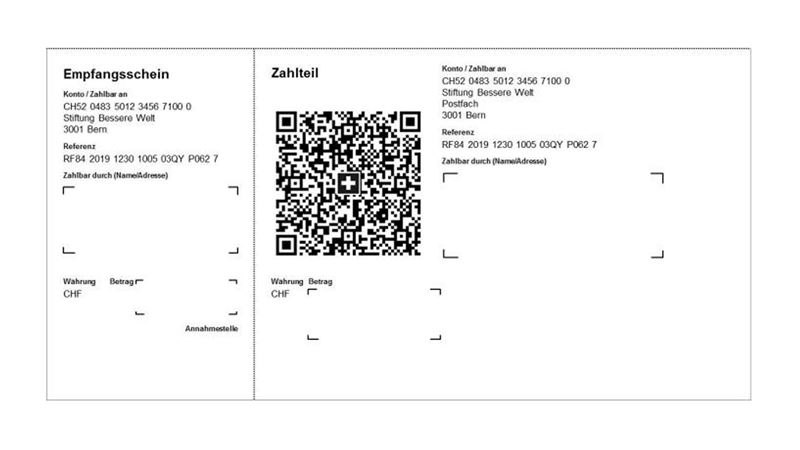
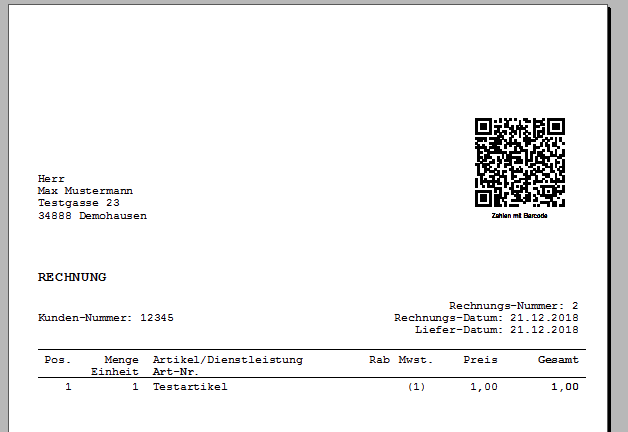
A QR-bill is an invoice with an integrated payment part and receipt in Switzerland. The QR-bill replaced the old orange and red payment slips on 30 September 2022.

The upper part of the QR-bill (1) is like a normal invoice; the lower part is divided into two parts just like today's payment slips: the payment part (2) and the receipt (3). The payment part includes the Swiss QR Code (4), which contains all relevant information necessary for both invoicing and payment. A typical QR bill looks like the following:

<figure><img src="/files/QtbsGi0rU1u48Jr7qnDs" alt=""><figcaption></figcaption></figure>

Here is the sample of request url:

{% code title="Request with header" overflow="wrap" %}

```javascript
GET https://api.fiat24.com/verify?qr=SPC%0D%0A0200%0D%0A1%0D%0ALI7830174502999200012%0D%0AS%0D%0ARobert%20Schneider%20AG%0D%0AMusterstrasse%0D%0A18%0D%0A9490%0D%0AVaduz%0D%0ALI%0D%0A%0D%0A%0D%0A%0D%0A%0D%0A%0D%0A%0D%0A%0D%0A1949.75%0D%0ACHF%0D%0AS%0D%0AHans%20Mustermann%0D%0AMusterstrasse%0D%0A27a%0D%0A9490%0D%0AVaduz%0D%0ALI%0D%0AQRR%0D%0A210000000003139471430009017%0D%0AAuftrag%20vom%2015.06.2020%0D%0AEPD%0D%0A%2F%2FS1%2F11%2F200427%2F30%2F102673386%2F31%2F200427%2F32%2F7.7%2F40%2F0%3A30
```

{% endcode %}

<pre class="language-json" data-title="Response body" data-line-numbers><code class="lang-json"><strong>{
</strong>   "type":"QRCH",
   "account":"LI7830174502999200012",
   "amount":"1949.75",
   "currency":"CHF",
   "reference":"21 00000 00003 13947 14300 09017",
   "creditor":{
      "name":"Robert Schneider AG",
      "street":"Musterstrasse 18",
      "city":"Vaduz",
      "zip":"9490",
      "country":"LI"
   },
   "ultimateDebtor":{
      "name":"Hans Mustermann",
      "street":"Musterstrasse 27a",
      "city":"Vaduz",
      "zip":"9490",
      "country":"LI"
   },
   "clientPayoutRefParams":{
      "currency":"CHF24",
      "amount":194975,
      "contactId":"QRCH",
      "purposeId":101,
      "ref":"uuidv4"
   }
}
</code></pre>

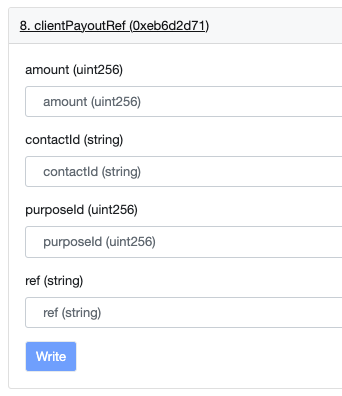
Inside the response body, the <mark style="color:blue;">line 2 - 20</mark> are information the wallet could show to the end user, indicating the business purpose of this QR code. The <mark style="color:blue;">line 21 - 27</mark> are the parameter values to call the smart contract function `CHF24.clientPayoutRef().`

<figure><img src="/files/am6a1jr4sXr6agXBlDk4" alt=""><figcaption></figcaption></figure>

#### Case 2: SEPA (EPC) QR

The European Payments Council QR Code guidelines define the content of a QR code that can be used to initiate SEPA credit transfer (SCT). These QR code guidelines are used on many invoices and payment requests in the European countries (mostly in Austria, Belgium, Finland, Germany, The Netherlands) .

Usually, SEPA QR has no fixed layout, it can be placed anywhere in an invoice or bill.

<figure><img src="/files/CAWTx3aLoICGwlxcAZq7" alt=""><figcaption></figcaption></figure>

{% code title="Request with header" overflow="wrap" %}

```javascript
GET https://api.fiat24.com/verify?qr=BCD%0A001%0A1%0ASCT%0ANTSBDEB1XXX%0ABlueRabbIT%0ADE59100110012628958324%0AEUR1043.62%0A%0A%0AInvoice%20%23%2016%20Customer%20%23%201%201st%20January%202021%0A
```

{% endcode %}

{% code title="Response body" lineNumbers="true" %}

```json
{
   "type":"QRSEPA",
   "account":"DE59100110012628958324",
   "bic":"NTSBDEB1XXX",
   "amount":1043.62,
   "currency":"EUR",
   "reference":"Invoice # 16 Customer # 1 1st January 2021",
   "creditor":{
      "name":"BlueRabbIT",
      "street":"",
      "city":"",
      "zip":"",
      "country":"DE"
   },
   "clientPayoutRefParams":{
      "currency":"EUR24",
      "amount": 104362,
      "contactId":"QRSEPA",
      "purposeId": 102,
      "ref":"uuidv4"
   }
}
```

{% endcode %}

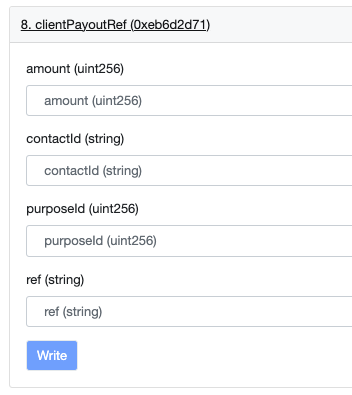
Inside the response body, the <mark style="color:blue;">line 2 - 14</mark> are information the wallet could show to the end user, indicating the business purpose of this QR code. The <mark style="color:blue;">line 15 - 21</mark> are the parameter values to call the smart contract function `EUR24.clientPayoutRef().`

<figure><img src="/files/rR6S9vOg4DOoQ8si8YiZ" alt=""><figcaption></figcaption></figure>

### 10. Bank Payout

This section explains how to make a bank payment in EUR or CHF to a supported bank account anywhere in the world. The process involves a few simple steps.

{% stepper %}
{% step %}
**Load the bank master data**

Developers must load our latest bank master data. The file is a large JSON, so cache it in local storage if possible. Be sure to refresh it periodically—use the `lastUpdateAt` timestamp field to detect and download the newest version.

<pre class="language-javascript" data-title="Open API, without header required"><code class="lang-javascript"><strong>GET https://api.fiat24.com/banks
</strong></code></pre>

{% hint style="warning" %}
At the moment, we don’t support every bank worldwide. However, our list of supported banks is growing, and we currently have around 500 banks in our list.
{% endhint %}

{% code title="Response body" lineNumbers="true" %}

```json
{
  "lastUpdateAt": 1756374790409,
  
  "banks": {
    "CH": [
      {
        "name": "UBS AG",
        "bankCode": "00315",
        "bankCodes": [
          "00315"
        ],
        "bic": "UBSBCHZZXXX",
        "country": "CH",
        "accountMask": "CH00\\0\\0315************",
        "accountPlaceholder": "CH0000315000000000000",
        "accountNotice": ""
      },
      {
        "name": "Credit Suisse (Schweiz) AG",
        "bankCode": "04835",
        "bankCodes": [
          "04106",
          "04251",
          "04425",
          "04835",
          "31000",
          "31881"
        ],
        "bic": "CRESCHZZXXX",
        "country": "CH",
        "accountMask": "CH00\\04835************",
        "accountPlaceholder": "CH0004835000000000000",
        "accountNotice": ""
      }
      ...
      ]
  }
}
```

{% endcode %}
{% endstep %}

{% step %}
**Check the destination bank account format**

If the bank is located in an IBAN country, the IBAN format must be validated locally. Below is the Node.js source code for the validation logic.

{% hint style="info" %}
All following countries, in ISO2 country codes, are IBAN countries.

`[AD,AE,AL,AT,AZ,BA,BE,BG,BH,BR,BY,CH,CR,CY,CZ,DE,DK,DO,DZ,EE,EG,ES,FI,FO,FR,GB,GE,GI,GL,GR,GT,HR,HU,IE,IL,IQ,IS,IT,JO,KW,KZ,LB,LC,LI,LK,LT,LU,LV,LY,MC,MD,ME,MK,MR,MT,MU,NL,NO,PK,PL,PS,PT,QA,RO,RS,SA,SC,SE,SI,SK,SM,ST,SV,TG,TL,TN,TR,UA,VA,VG,XK]`
{% endhint %}

<pre class="language-javascript" data-title="Include this logic in your local code" data-line-numbers><code class="lang-javascript">export function isValidIbanNumber(input: string): boolean {
<strong> const IBAN_CODE_LENGTHS: Record&#x3C;string, number> = {
</strong>    AD: 24, AE: 23, AT: 20, AZ: 28, BA: 20, BE: 16, BG: 22, BH: 22, BR: 29,
    CH: 21, CY: 28, CZ: 24, DE: 22, DK: 18, DO: 28, EE: 20, ES: 24, FI: 18,
    FO: 18, FR: 27, GB: 22, GI: 23, GL: 18, GR: 27, GT: 28, HR: 21, HU: 28,
    IE: 22, IL: 23, IS: 26, IT: 27, JO: 30, KW: 30, KZ: 20, LB: 28, LI: 21,
    LT: 20, LU: 20, LV: 21, MC: 27, MD: 24, ME: 22, MK: 19, MR: 27, MT: 31,
    MU: 30, NL: 18, NO: 15, PK: 24, PL: 28, PS: 29, PT: 25, QA: 29, RO: 24,
    RS: 22, SA: 24, SE: 24, SI: 19, SK: 24, SM: 27, TN: 24, TR: 26, AL: 28,
    BY: 28, CR: 22, EG: 29, GE: 22, IQ: 23, LC: 32, SC: 31, ST: 25, SV: 28,
    TL: 23, UA: 29, VA: 22, VG: 24, XK: 20,
  };

  // 1) sanitize
  const iban = String(input).toUpperCase().replace(/[^A-Z0-9]/g, "");

  // 2) basic shape &#x26; length
  const m = iban.match(/^([A-Z]{2})(\d{2})([A-Z\d]+)$/);
  if (!m) return false;

  const country = m[1];
  const expectedLen = IBAN_CODE_LENGTHS[country];
  if (!expectedLen || iban.length !== expectedLen) return false;

  // 3) move country+check to end, convert letters -> numbers (A=10 ... Z=35)
  const rearranged = (m[3] + m[1] + m[2]).replace(/[A-Z]/g, ch =>
    String(ch.charCodeAt(0) - 55)
  );

  // 4) mod-97 (chunked to avoid big integers)
  let checksum = rearranged.slice(0, 2);
  for (let i = 2; i &#x3C; rearranged.length; i += 7) {
    const fragment = checksum + rearranged.substring(i, i + 7);
    checksum = String(parseInt(fragment, 10) % 97);
  }
  return checksum === "1";
}
</code></pre>

{% endstep %}

{% step %}
**Obtain the bank data**

If the IBAN is valid, you can easily retrieve the bank details from the master bank data. Alternatively, the bank data can be extracted directly from the JSON master file.

{% code title="Open API, without header required" %}

```javascript
GET https://api.fiat24.com/banks/iban/{ibanNo}
```

{% endcode %}

{% code title="Response body with successful result" lineNumbers="true" %}

```json
{
    "name"         : "Zürcher Kantonalbank",
    "bankCode"     : "00700",
    "bankCodes"    : ["00700",,"00730","00754","00755","30700"],
    "bic"          : "ZKBKCHZZXXX",
    "country"      : "CH",
    "accountMask"  : "CH00\\0\\07\\0\\0************",
    "accountPlaceholder":"CH0000700000000000000",
    "accountNotice":""
}
```

{% endcode %}

Or, if anything wrong,

{% code title="If the request returns an error" lineNumbers="true" %}

```json
{
    "error": "Invalid IBAN."
}
```

{% endcode %}
{% endstep %}

{% step %}
**Payment Purpose**

User must fill in an integer as purposeId for each bank payout. The values are static and can be get from the following API.

<pre class="language-javascript" data-title="Open API"><code class="lang-javascript"><strong>GET https://api.fiat24.com/payment-purposes
</strong></code></pre>

{% code title="Response body" lineNumbers="true" %}

```json
{
  "purposes": [
    {
      "value": 0,
      "name": "Transfer to own account (other bank)"
    },
    {
      "value": 1,
      "name": "Purchase of goods"
    },
    {
      "value": 2,
      "name": "Payment for services (leisure, medical, travel, education, insurance, telecom, etc.)"
    },
    {
      "value": 3,
      "name": "Family support and inheritance"
    },
    {
      "value": 4,
      "name": "Charity donation"
    },
    {
      "value": 5,
      "name": "Salary, Benefits, Dividends"
    },
    {
      "value": 6,
      "name": "Real Estate and rent"
    },
    {
      "value": 7,
      "name": "Credit / debit card coverage"
    },
    {
      "value": 8,
      "name": "Investment, securities, trading"
    },
    {
      "value": 9,
      "name": "Currency exchange"
    },
    {
      "value": 10,
      "name": "Tax and governmental payments"
    },
    {
      "value": 11,
      "name": "Loan, Collateral"
    }
  ]
}
```

{% endcode %}
{% endstep %}

{% step %}
**Recipient Address**

To correctly fill in the recipient’s address, we need high-quality data to avoid failed or returned payments. The consistency between the city/town name and the country is especially important. For example, if an address lists `Tokyo` with country `USA`, the payment is very likely to be returned.

We only accept city or town names from our predefined list. As a developer, you need to read this JSON file and provide a dropdown list to your users. This way, users select the country and city from the static data instead of entering them freely.

{% code title="Open API" %}

```javascript
https://api.fiat24.com/country-cities
```

{% endcode %}

The response is static, so developers can store the large JSON file locally for faster access. The `lastUpdateAt` timestamp serves as version information.

The `postalCodeRegEx` is used to validate postal codes for each country.

{% code title="Response body" lineNumbers="true" %}

```json
{
  "lastUpdateAt": 1757713078034,
  "countries": {
    "ARG": {
      "name": "Argentina",
      "iso3": "ARG",
      "postalCodeRegEx": "^[A-Z]\\d{4}\\s[A-Z]{3}$",
      "cities": [
        "Buenos Aires",
        "Córdoba",
        "Rosario",
        "Mendoza",
        "San Miguel de Tucumán",
        "La Plata",
        "Mar del Plata",
        "Salta",
        "Santa Fe",
        "San Juan",
        "Resistencia",
        "Santiago del Estero",
        "Corrientes",
        "Neuquén",
        "Posadas",
        "Formosa",
        "San Salvador de Jujuy",
        "Paraná",
        "Bahía Blanca",
        "San Fernando del Valle de Catamarca",
        "Comodoro Rivadavia",
        "Trelew",
        "Río Gallegos",
        "San Luis",
        "La Rioja",
        "Santa Rosa",
        "Rawson"
      ]
    }
  }
}
```

{% endcode %}
{% endstep %}

{% step %}
**Construct the Payment Data**

Build a JSON data structure that includes all the verified data.

{% code lineNumbers="true" %}

```javascript
const bankPaymentReqest = {
  "account"   : <string>,    // sample: CH121234123412341
  "bankName"  : <string>,    // from /banks API
  "bic"       : <string>,    // from /banks API
  "purpose"   : <purposeId>, // from /payment-purposes API
  "reference" : <string>,    // optional
  "creditor"  : <If sending to same owner>
                ? "BR" : {
                    "name"    : <string>,
                    "street"  : <string>,
                    "city"    : <string>, // from /country-cities API
                    "zip"     : <string>, // from /country-cities API
                    "country" : <string>, // from /country-cities API
                  }
}
```

{% endcode %}
{% endstep %}

{% step %}
**Call Smart Contract**

Finally, calling the `clientPayoutRef()` smart contract function will trigger the bank payment. This method is currently available in the `EUR24` and `CHF24` contracts.

To successfully call the method, you need three parameters: `contactId`, `purposeId`, `ref`. Calling the following API will convert your payment request data into three parameter values.

{% code title="Request with header" %}

```javascript
GET https://api.fiat24.com/verify?sp=${encodeURIComponent(JSON.stringify(bankPaymentReqest))}
```

{% endcode %}

Response

<pre class="language-json" data-title="" data-line-numbers><code class="lang-json"><strong>{
</strong><strong>  "contactId" : &#x3C;string>,
</strong>  "purposeId" : &#x3C;number>,
  "ref"       : &#x3C;string>
}
</code></pre>

If something is wrong

```json
// If the request returns an error
{
    "error": <string>
}
```

Detailed instructions for calling this method can be found [here](/developer/integration-guide/part-1-smart-contracts.md#crypto-conversion).
{% endstep %}

{% step %}
**Done**

Once the payment is submitted, it enters the queue. It will be processed during bank operating hours (Monday to Friday, 07:00–17:00 CET, excluding public holidays).
{% endstep %}
{% endstepper %}

## Public APIs&#x20;

In this section, the following APIs are publicly accessible and do not require a signed header for requests. However, to prevent excessive or abusive usage, we enforce backend safeguards. If too many requests are made within a short time window, the system will temporarily block the activity and return a `500` error response.

### 1. IBAN

Each Fiat24 NFT has a unique Swiss IBAN, with the ending digits matching the NFT number. For example, the NFT #<mark style="color:purple;">12345</mark> will own the IBAN of CH68830510000000<mark style="color:purple;">12345</mark>. Wallet Provider can calculate the Swiss IBAN directly from the NFT id with the following request:

#### From API

{% code title="Request" %}

```javascript
GET https://api.fiat24.com/iban/<nftId>
```

{% endcode %}

<pre class="language-json" data-title="Response Body of GET https://api.fiat24.com/iban/12345" data-line-numbers><code class="lang-json"><strong>{
</strong>  "iban" : "CH6883051000000012345"
}
</code></pre>

#### From your own script

Or, you can also generate the IBAN with the following code.

{% code title="Node.js function to calculate the IBAN from NFT id" lineNumbers="true" %}

```javascript
const FIAT24_FIXED_IBAN = "83051";

function iso7064Mod97_10(iban) {
    var remainder = iban,
        block;

    while (remainder.length > 2){
        block = remainder.slice(0, 9);
        remainder = parseInt(block, 10) % 97 + remainder.slice(block.length);
    }

    return parseInt(remainder, 10) % 97;
}

function iso13616Prepare(iban) {
    iban = iban.toUpperCase();
    iban = iban.substr(4) + iban.substr(0,4);
    const A = 'A'.charCodeAt(0),
          Z = 'Z'.charCodeAt(0);
    return iban.split('').map(function(n){
        var code = n.charCodeAt(0);
        if (code >= A && code <= Z){
            // A = 10, B = 11, ... Z = 35
            return code - A + 10;
        } else {
            return n;
        }
    }).join('');
}

function getChecksumWithDynamicTokenIDLength(fullTokenId) {
    const bban = `${FIAT24_FIXED_IBAN}${fullTokenId}`;
    const remainder = iso7064Mod97_10(iso13616Prepare("CH" + '00' + bban));
    const checkDigit = ('0' + (98 - remainder)).slice(-2);
    return checkDigit;
}

function getIBAN(tokenId) {
    const tokenIdS = tokenId.toString();
    let fullTokenId = tokenIdS;
    while (fullTokenId.length < 12) {
        fullTokenId = "0" + fullTokenId;
    }
    const checksum = getChecksumWithDynamicTokenIDLength(fullTokenId);
    return `CH${checksum}${FIAT24_FIXED_IBAN}${fullTokenId}`;
}
```

{% endcode %}

### 2. Country List

Fiat24 currently cannot serve all countries and regions, but we are actively expanding the scope of regions where we can provide our services. The eligible countries are published from our own FAQ, however, we provide the API for wallet providers to check the eligible countries efficiently.

{% code title="Request" %}

```javascript
GET https://api.fiat24.com/countries
```

{% endcode %}

Response body providers all **ISO-3** countries codes for

1. Eligible Client Domiciles
2. Eligible Client Domiciles for obtain a Debit card
3. Blacklist nationalities

{% code title="Response body" lineNumbers="true" %}

```json
{
  "eligibleDomiciles": [
    "ALA",
    "AUS",
    ...
    "SWE",
    "TWN"
  ],
  "eligibleDomicilesForCards": [
    "ALA",
    "AUT",
    ...
    "SWE",
    "CHE"
  ],
  "blacklistNationalities": [
    "GUM",
    "IRN",
    "PRK",
    "MNP",
    "PRI",
    "RUS",
    "UMI",
    "USA"
  ]
}
```

{% endcode %}

### 3. Forex rates

{% code title="Request" %}

```javascript
GET https://api.fiat24.com/rates
```

{% endcode %}

Each FX rate includes three values—interbank `rate`, `bid` rate, and `ask` rate—along with a `lastUpdatedAt` timestamp.

{% code title="Response body" lineNumbers="true" %}

```json
{
  ...
  
  "CNHCHF": {
    "rate": 0.1203,
    "bid": 0.1191,
    "ask": 0.1215,
    "lastUpdateAt": 1710402772084
  },
  "USDGBP": {
    "rate": 0.7647,
    "bid": 0.7571,
    "ask": 0.7723,
    "lastUpdateAt": 1710402772084
  },
  
  ...
}
```

{% endcode %}

### 4. KYC Status Check

The following API returns the KYC status of a certain NFT.

{% code title="Request" %}

```javascript
GET https://api.fiat24.com/status-kyc?id=<nftId>
```

{% endcode %}

The response code can be easily referred as:

* `NOT_INIT` : KYC has not been started yet.
* `CA_COMPLETED_PENDING_SCAN` : First part registration completed, ready for ID scan step.
* `PROCESSING_SCAN` : User scanned the passport, waiting to process the information (around 15-20 seconds), after that user will become either: *MANUAL\_REVIEW*, *COMPLETED* or *REJECTED.*
* `PENDING_ACTION` : Client needs action to finish the KYC, for example the passport has not been scanned yet, or has been scanned but user needs to re-do it, or needs to re-add address.
* `COMPLETED` : The KYC has been successfully done, the client is in live status.
* `MANUAL_REVIEW` : The KYC has been submitted, but due to regulatory reason, it's under manual review phase.
* `REJECTED` : The KYC has been submitted, but rejected by compliance. Due to regulatory reason or company policy, we cannot serve the client.
* `INTERNAL_ERROR` : Unknown system error. When the NFT is not minted, you will have such status as well.

### 5. Email Availability

In Fiat24, each email address can only be associated with a single business relationship. Therefore, an email check must be performed in two scenarios: (1) during registration, and (2) when changing an existing email. This API provides the email check functionality. An email is considered valid only if all response fields return `false`.

{% code title="Request" %}

```javascript
GET https://api.fiat24.com/exists?email=<email>
```

{% endcode %}

{% code title="Response body when an email is used." lineNumbers="true" %}

```json
{
  "status" : 200,
  "data"   : {
    "email"     : true,
    "cardEmail" : true
  }
}
```

{% endcode %}

{% code title="Response body when email is available" lineNumbers="true" %}

```json
{
  "status" : 200,
  "data"   : {
    "email" : false
  }
}
```

{% endcode %}


---

# Agent Instructions: Querying This Documentation

If you need additional information that is not directly available in this page, you can query the documentation dynamically by asking a question.

Perform an HTTP GET request on the current page URL with the `ask` query parameter:

```
GET https://docs.fiat24.com/developer/integration-guide/part-2-api-reference.md?ask=<question>
```

The question should be specific, self-contained, and written in natural language.
The response will contain a direct answer to the question and relevant excerpts and sources from the documentation.

Use this mechanism when the answer is not explicitly present in the current page, you need clarification or additional context, or you want to retrieve related documentation sections.